How to hide the language bar from the taskbar in Windows 11 script store 360

Hello everyone welcome to Script Store 360, you might be finding a solution to hide the language bar in windows 11 because you might don't want it, s you are in the right place in this tutorial we are going to show you how to hide the language bar in windows 11, if you follow this tutorial carefully you can easily conceal language bar from taskbar in windows, so without wasting much time let's check How to hide language bar from taskbar in Windows 11!

How to hide the language bar from the taskbar in Windows 11

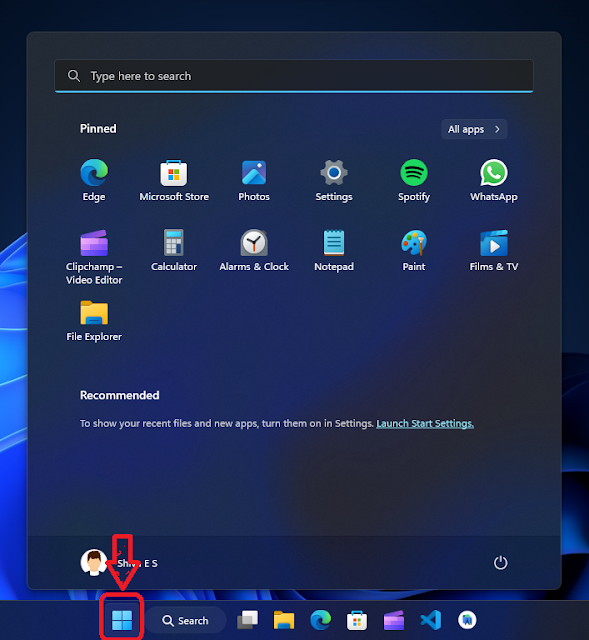
  • First click on the Windows icon on the taskbar
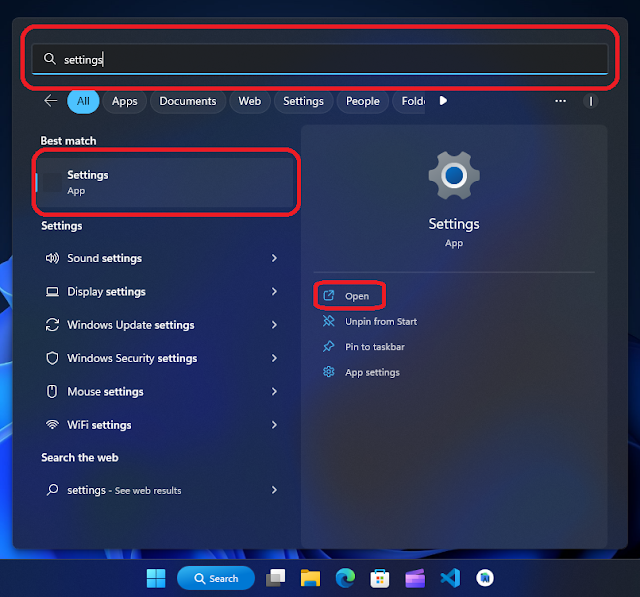
  • Then click on the search bar then find Settings and click Open to open Settings App
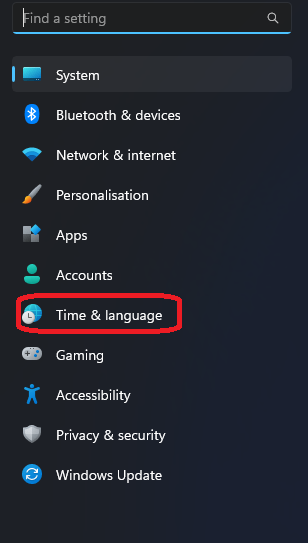
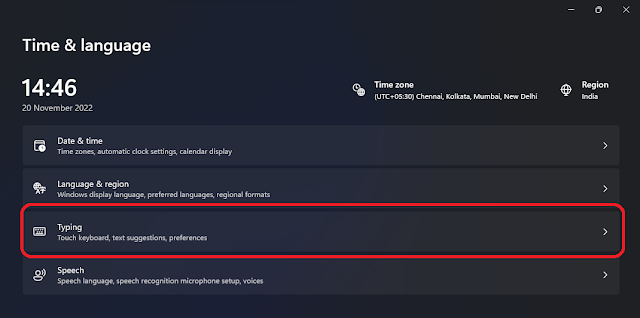
  • On Settings click on Time & language option
  • On that click on Typing option
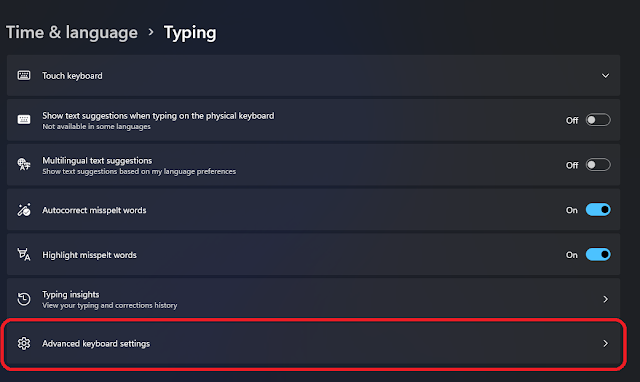
  • Then click on Advanced keyboard settings
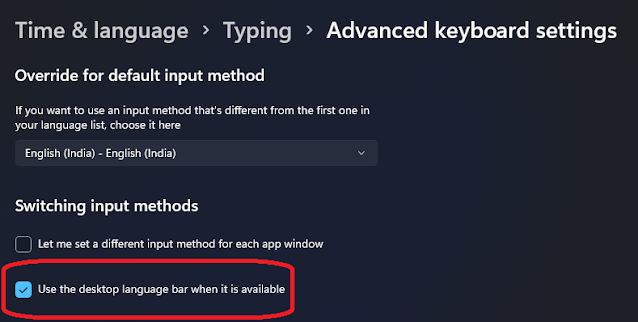
  • Then thick "Use the desktop language bar when it is available"
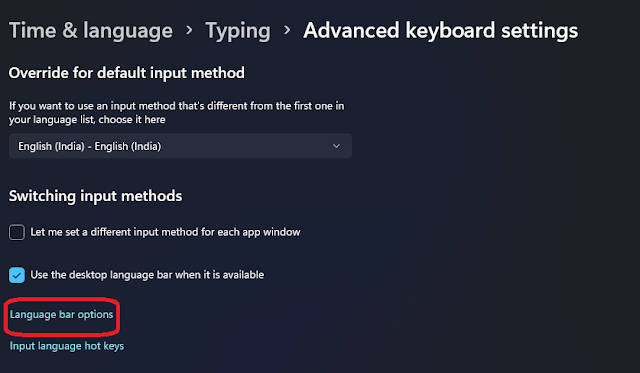
  • Then click on the Language bar options
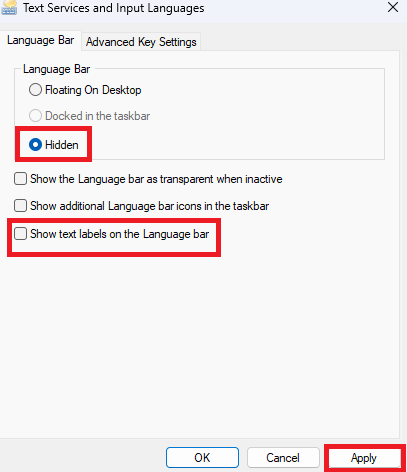
  • On that popup tick "Hidden" and untick "Show text labels on the Language bar" and click on  Apply

Now you may be noticed that the language bar is not visible!

Video tutorial

Conclusion
Hope this How to hide the language bar from the taskbar in Windows 11 tutorial will be useful to you, if you have any doubts related to this tutorial ask me in the comment, and do share with your friends, Thanks for visiting, Have a nice day!

একটি মন্তব্য পোস্ট করুন

🌟 সম্মানিত ষ্ক্রিপ্ট ষ্টোর ৩৬০ পাঠকরা! 🌟

আপনি আমাদের আলোচনায় জড়িত থাকতে পেরে আমরা আনন্দিত। প্রত্যেকের জন্য একটি সম্মানজনক এবং অন্তর্ভুক্তিমূলক পরিবেশ নিশ্চিত করার জন্য, আমরা নিম্নলিখিত নির্দেশিকাগুলির সাথে আপনার সহযোগিতার অনুরোধ করছিঃ

১. গোপনীয়তা রক্ষাঃ অনুগ্রহ করে আপনার মন্তব্যে সংবেদনশীল বা ব্যক্তিগত তথ্য শেয়ার করা থেকে বিরত থাকুন।

২. ইতিবাচকতা ছড়ানোঃ ঘৃণাত্মক বক্তৃতা বা আপত্তিজনক ভাষার প্রতি আমরা শূন্য-সহনশীলতার নীতি বজায় রাখি। আসুন আমাদের কথোপকথনকে সম্মানজনক এবং বন্ধুত্বপূর্ণ রাখি।

৩. পছন্দের ভাষাঃ ইংরেজি বা বাংলা’তে নির্দ্বিধায় নিজেকে প্রকাশ করুন। এই দুটি ভাষা আমাদের পরিষ্কার এবং সুসংগত আলোচনা বজায় রাখতে সাহায্য করবে।

৪. বৈচিত্র্যকে সম্মানঃ একটি অন্তর্ভুক্তিমূলক পরিবেশ গড়ে তোলার জন্য, আমরা দয়া করে অনুরোধ করছি যে আপনি আপনার মন্তব্যে ধর্মীয় বিষয় নিয়ে আলোচনা করা এড়িয়ে চলুন।

মনে রাখবেন, আপনার মতামতগুলি মূল্যবান, এবং আমরা আমাদের পাঠকদের সবার জন্য একটি স্বাগত জানানোর জায়গা করে তোলার জন্য আপনার প্রতিশ্রুতির প্রশংসা করি৷ আসুন গঠনমূলক এবং সম্মানজনক আলোচনার মাধ্যমে একসাথে শিখতে এবং বৃদ্ধি পেতে থাকি।

আমাদের ষ্ক্রিপ্ট ষ্টোর ৩৬০ ওয়েবসাইটে যুক্ত থাকার জন্য আপনাকে ধন্যবাদ! 🌟
কুকি সম্মতি
আমরা ট্রাফিক বিশ্লেষণ করতে, আপনার পছন্দগুলি মনে রাখতে এবং আপনার অভিজ্ঞতাকে অপ্টিমাইজ করতে এই সাইটে কুকিজ পরিবেশন করি৷
দূক্ষিত
মনে হচ্ছে আপনার ইন্টারনেট সংযোগে কিছু সমস্যা আছে। অনুগ্রহ করে ইন্টারনেটের সাথে সংযোগ করুন এবং আবার ব্রাউজিং শুরু করুন৷
AdBlock Detected!
We have detected that you are using adblocking plugin in your browser.
The revenue we earn by the advertisements is used to manage this website, we request you to whitelist our website in your adblocking plugin.
Site is Blocked
Sorry! This site is not available in your country.